HOW TO ADD IMAGE TO AUTOCAD

· No comments
If you want to trace from handdrawn image or have a 3d model you want to reference then you can import image in autocad as external reference.

Type 'image' or 'xref' in command line to open the external reference panel


From left side choose to add image


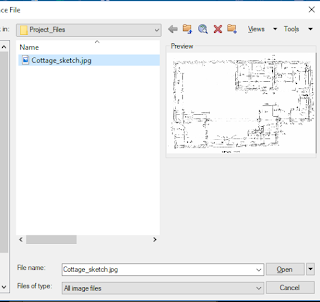
Browse the location for desired image


Choose to set insertion point and scale on screen . And set rotation as desired.


Now the image is loaded in autocad you can unload,reload and detach image from external reference panel


HOW TO : GET RID OF BLUE OR GREEN SCREEN PATCHES IN LAPTOP

· No comments
The screen patches can be caused either due to faulty graphics card or screen damage. But there is no surefire way of finding specific cause without proper analysis of system. Here are some ways to fix screen patches.


  • Update Windows 
  • Update graphics driver for both display and dedicated cards if applicable
  • Fix color settings
UPDATE WINDOWS

Windows update will generally fix problem if patches were caused due to corrupt installation or any bug in previous update itself

UPDATE GRAPHICS DRIVER 
Main reason for screen patches is graphics driver so check if updating the graphics driver solves your problem or not. Be sure to update both display and dedicated driver if applicable

FIX COLOR SETTINGS
Go to graphics control panel of your display driver and find color settings options. From there adjust brightness and contrast and check either sample in right or portion of screen with patch problem till it goes away. At optimum setting save it

IF YOU KNOW OF ANY OTHER WAYS PLEASE DO SHARE 

HOW TO : BLOCK INTERNET CONNECTION OF PROGRAM IN WINDOWS

· No comments
You would want to block incoming or outgoing connection from program either to bypass frequent online update checks or any reason what so ever.

STEPS

1. Go to Control Panel and search for Window Defender Firewall
   
2 Click on Advanced settings

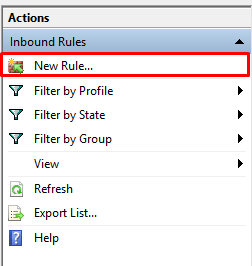
3  Add new inbound and outbound rules
 
4 Choose Program , Program Path, Block connection and finish the process.

The rules are deleted if firewall is reset 

HOW TO : ACTIVATE MICROSOFT OFFICE 2016

· No comments
If you have  Window 10 version without product key , KMSpico is generally used to activate it. If you download it from unofficial website or many fake websites it will be bundled with malware.Here is an easy way to activate windows 10

ACTIVATE WINDOWS 10
STEP 1 : COPY THE CODE BELOW 
@echo off
title Activate Microsoft Office 2016 ALL versions for FREE!&cls&echo ============================================================================&echo #Project: Activating Microsoft software products for FREE without software&echo ============================================================================&echo.&echo #Supported products:&echo - Microsoft Office Standard 2016&echo - Microsoft Office Professional Plus 2016&echo.&echo.&(if exist "%ProgramFiles%\Microsoft Office\Office16\ospp.vbs" cd /d "%ProgramFiles%\Microsoft Office\Office16")&(if exist "%ProgramFiles(x86)%\Microsoft Office\Office16\ospp.vbs" cd /d "%ProgramFiles(x86)%\Microsoft Office\Office16")&(for /f %%x in ('dir /b ..\root\Licenses16\proplusvl_kms*.xrm-ms') do cscript ospp.vbs /inslic:"..\root\Licenses16\%%x" >nul)&(for /f %%x in ('dir /b ..\root\Licenses16\proplusvl_mak*.xrm-ms') do cscript ospp.vbs /inslic:"..\root\Licenses16\%%x" >nul)&echo.&echo ============================================================================&echo Activating your Office...&cscript //nologo ospp.vbs /unpkey:WFG99 >nul&cscript //nologo ospp.vbs /unpkey:DRTFM >nul&cscript //nologo ospp.vbs /unpkey:BTDRB >nul&cscript //nologo ospp.vbs /unpkey:CPQVG >nul&cscript //nologo ospp.vbs /inpkey:XQNVK-8JYDB-WJ9W3-YJ8YR-WFG99 >nul&set i=1
:server
if %i%==1 set KMS_Sev=kms7.MSGuides.com
if %i%==2 set KMS_Sev=kms8.MSGuides.com
if %i%==3 set KMS_Sev=kms9.MSGuides.com
if %i%==4 goto notsupported
cscript //nologo ospp.vbs /sethst:%KMS_Sev% >nul&echo ============================================================================&echo.&echo.
cscript //nologo ospp.vbs /act | find /i "successful" && (echo.&echo ============================================================================&echo.&echo #My official blog: MSGuides.com&echo.&echo #How it works: bit.ly/kms-server&echo.&echo #Please feel free to contact me at msguides.com@gmail.com if you have any questions or concerns.&echo.&echo #Please consider supporting this project: donate.msguides.com&echo #Your support is helping me keep my servers running everyday!&echo.&echo ============================================================================&choice /n /c YN /m "Would you like to visit my blog [Y,N]?" & if errorlevel 2 exit) || (echo The connection to my KMS server failed! Trying to connect to another one... & echo Please wait... & echo. & echo. & set /a i+=1 & goto server)
explorer "http://MSGuides.com"&goto halt
:notsupported
echo.&echo ============================================================================&echo Sorry! Your version is not supported.&echo Please try installing the latest version here: bit.ly/getmsps
:halt
pause 
STEP 2 : SAVE THE CODE IN NOTEPAD AS NAME.BAT ( FILE NAME DOESNOT MATTER EXTENSION MATTERS )
STEP 3 : RUN THE FILE AS ADMINISTRATOR

HOW TO : Fix "Printer not installed error"

· No comments
Printer not installed error can be seen for many reasons , first simply being because printer is not installed. 
I encountered this problem when printer was installed but not working.
Here is the fix

STEP 1 : Open run command with CTRL+R
STEP 2 : Type "services.msc" 
STEP 3 : Find "Print Spooler" in sevices dialog box
STEP 4 : Right click print spooler and select start


HOW TO : Activate Microsoft Project 2016

· No comments
Though Microsoft Office and WIndows can be activated using KMSpico , it is not useful for microsoft project and microsoft project pro. Here is an easy way to activate windows 10


ACTIVATE MICROSOFT PROJECT 2016
STEP 1 : COPY THE CODE BELOW 
@echo off
title Activate Microsoft Project 2016 ALL versions for FREE!&cls&echo ============================================================================&echo #Project: Activating Microsoft software products for FREE without software&echo ============================================================================&echo.&echo #Supported products:&echo - Microsoft Project Standard 2016&echo - Microsoft Project Professional Plus 2016&echo.&echo.&(if exist "%ProgramFiles%\Microsoft Office\Office16\ospp.vbs" cd /d "%ProgramFiles%\Microsoft Office\Office16")&(if exist "%ProgramFiles(x86)%\Microsoft Office\Office16\ospp.vbs" cd /d "%ProgramFiles(x86)%\Microsoft Office\Office16")&cscript //nologo ospp.vbs /inslic:"..\root\Licenses16\ProjectProVL_KMS_Client-ppd.xrm-ms" >nul&cscript //nologo ospp.vbs /inslic:"..\root\Licenses16\ProjectProVL_KMS_Client-ul-oob.xrm-ms" >nul&cscript //nologo ospp.vbs /inslic:"..\root\Licenses16\ProjectProVL_KMS_Client-ul.xrm-ms" >nul&cscript //nologo ospp.vbs /inslic:"..\root\Licenses16\client-issuance-bridge-office.xrm-ms" >nul&cscript //nologo ospp.vbs /inslic:"..\root\Licenses16\client-issuance-root.xrm-ms" >nul&cscript //nologo ospp.vbs /inslic:"..\root\Licenses16\client-issuance-root-bridge-test.xrm-ms" >nul&cscript //nologo ospp.vbs /inslic:"..\root\Licenses16\client-issuance-stil.xrm-ms" >nul&cscript //nologo ospp.vbs /inslic:"..\root\Licenses16\client-issuance-ul.xrm-ms" >nul&cscript //nologo ospp.vbs /inslic:"..\root\Licenses16\client-issuance-ul-oob.xrm-ms" >nul&cscript //nologo ospp.vbs /inslic:"..\root\Licenses16\pkeyconfig-office.xrm-ms" >nul&echo.&echo ============================================================================&echo Activating your Project...&cscript //nologo ospp.vbs /unpkey:KQBVC >nul&cscript //nologo ospp.vbs /unpkey:G83KT >nul&cscript //nologo ospp.vbs /inpkey:YG9NW-3K39V-2T3HJ-93F3Q-G83KT >nul&set i=1:serverif %i%==1 set KMS_Sev=kms7.MSGuides.comif %i%==2 set KMS_Sev=kms8.MSGuides.comif %i%==3 set KMS_Sev=kms9.MSGuides.comif %i%==4 goto notsupportedcscript //nologo ospp.vbs /sethst:%KMS_Sev% >nul&echo ============================================================================&echo.&echo.cscript //nologo ospp.vbs /act | find /i "successful" && (echo.&echo ============================================================================&echo.&echo #My official blog: MSGuides.com&echo.&echo #How it works: bit.ly/kms-server&echo.&echo #Please feel free to contact me at msguides.com@gmail.com if you have any questions or concerns.&echo.&echo #Please consider supporting this project: donate.msguides.com&echo #Your support is helping me keep my servers running everyday!&echo.&echo ============================================================================&choice /n /c YN /m "Would you like to visit my blog [Y,N]?" & if errorlevel 2 exit) || (echo The connection to my KMS server failed! Trying to connect to another one... & echo Please wait... & echo. & echo. & set /a i+=1 & goto server)explorer "http://MSGuides.com"&goto halt:notsupportedecho.&echo ============================================================================&echo Sorry! Your version is not supported.&echo Please try installing the latest version here: bit.ly/getmsps:haltpause

STEP 2 : SAVE THE CODE IN NOTEPAD AS NAME.BAT ( FILE NAME DOESNOT MATTER EXTENSION MATTERS )

STEP 3 : RUN THE FILE AS ADMINISTRATOR