HOW TO: FIX WIFI NOT TURNING ON IN WINDOWS 10
With every subsequent windows update, there may arise problems for end-user. One of the typical problem associated with window update is wifi not turning on. Here are some ways that you can use to fix wifi not turning on
1. SYSTEM RESTORE
If Windows was running smoothly before the update, your best bet will be system restore.You can also use update rollback feature if there is no system restore point before the update.2. WLAN AutoConfig
Use run command then type "services.msc". Find WLAN AutoConfig option, right click on then choose properties. Set startup type as "Disable".Then after restart the PC and set the WLAN AutoConfig startup type to "Automatic".3. NETWORK RESET
Right click the wifi symbol in taskbar.Choose open network and internet setting. Select Network reset option. This will reset all network drivers and set PC to restart in 5min.
4. REINSTALL NETWORK DRIVERS
Goto device manager, find the network driver for wifi and uninstall it. Restart the PC. Windows will automatically install the driver.
5. INSTALL OEM NETWORK DRIVERS
Install network driver from OEM.From device manager find the model of network driver and search for driver update on OEM site.
6. INSTALL BLUETOOTH DRIVERS
Installing bluetooth driver may help to fix wifi not turning on problem in windows 10. Go to OEM site to look for bluetooth driver.
7. MAKE SURE FLIGHT MODE IS OFF,WIFI IS ON
Make sure the flight mode is off. Wifi is disabled in ON flight mode
Windscribe VPN : Review
With internet censorship more prevalent than ever , VPN market is growing by leaps and bound.Upon an online search we can find many VPN providers but most are generally costly and free if available are limited to browser extension. Windscribe VPN has best of both world. It provides desktop program as well as browser extension.It is a freemium product with intial capacity of 10 GB with email verification.We can increase the capacity with referral


For download just CLICK HEREDOWNLOAD
It is available for Windows,Mac,Linux,Chrome,Firefox,IphonePLATFORM
The interface is pretty sleek. You set which country you want to browse from and press on. You can allow or disallow firewall. First it will disconnect from present connection then tunnel through VPN connection.It provides many free popular location along with premium location.with subscription.INTERFACE

HOW TO : Fix Wordpress Site Url
To change siteurl of wordpress site you have to goto Settings- General - Siteurl . If you mistakenly change site url from https://fonshop.tk to https://wwww.fonshop.tk then the site willnot load.
 Not only will it not load you will also loose accesss to your admin dashboard.Let's look how we can solve this problem.
Goto your hosting provider dashboard , find the file manager, look for a file named "wp-config.php"
then edit this file.Add this line to the file.
define( 'WP_HOME', 'https://fonshop.tk' );
define( 'WP_SITEURL', 'https://fonshop.tk' );


There you have it. You have access to your wordpress dashboard

With this method you won't be able to change the siteurl within your admin dashboard.1. Hardset Method
Goto your hosting provider dashboard , find the file manager, look for a file named "wp-config.php"
then edit this file.Add this line to the file.
define( 'WP_HOME', 'https://fonshop.tk' );
define( 'WP_SITEURL', 'https://fonshop.tk' );

where inplace of https://fonshop.tk will be the name of your file
2. PHP Method
Go to your database manager and login. Find "wp_options" then click on browse.Edit siteurl and home "option_name" to desired value.

3. Relocate Method
As in first method go to "wp-config.php" . Type
define( 'RELOCATE', true );
just before /*That's all, stop editing!
Go to https://yourdomainname.com/wp-login.php login as usual and change the siteurl and wordpress url in General-settings. Afterwards remove the relocate command .
There you have it. You have access to your wordpress dashboard
HOW TO : Change DNS in windows 10
Right Click on WIFI/LAN icon in taskbar
It will take you to - Settings-Network and Internet- Status
Click on - Change adapter option
Click on which adapter you want to change DNS for
Right Click on it and go to properties
Click on internet protocol verion 4 or version 6 depending on which DNS you want to change
Click on properties then click on use the following DNS server
FOR CLOUDFLARE DNS
Use 1.1.1.1 and 1.0.0.1
It will take you to - Settings-Network and Internet- Status
Click on - Change adapter option
Click on which adapter you want to change DNS for
Right Click on it and go to properties
Click on internet protocol verion 4 or version 6 depending on which DNS you want to change
Click on properties then click on use the following DNS server
FOR CLOUDFLARE DNS
Use 1.1.1.1 and 1.0.0.1
HOW TO ADD IMAGE TO AUTOCAD
If you want to trace from handdrawn image or have a 3d model you want to reference then you can import image in autocad as external reference.



Now the image is loaded in autocad you can unload,reload and detach image from external reference panel

Type 'image' or 'xref' in command line to open the external reference panel

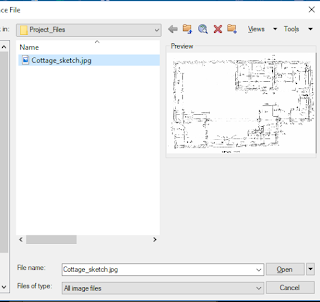
From left side choose to add image

Browse the location for desired image

Choose to set insertion point and scale on screen . And set rotation as desired.

Now the image is loaded in autocad you can unload,reload and detach image from external reference panel
